Removal of Citrix XenDesktop / XenApp 7.x VDA fails with InstallFailure 1603
Some of you might have seen the following problem – the removal of the VDA failed: 
If you check the details you get some more information’s – e.g. the removal of the Citrix Profile Management failed. 
Removal of MSI Product ‘profilemgt_x64.msi’ (‘{9321930C-A53F-452C-80D5-AE1A8D69D9C0}’) failed with code ‘InstallFailure’ (1603).
Or the VdaMonitorPlugin_x64.MSI cannot be removed. 
Well – but there is no solution shown how to fix it nor you can find a documentation from Citrix to solve the problem. You can’t just start the removal from the Control Panel – they are not shown under Programs.
Luckily Microsoft has published a really helpful Tool that helps to remove “problematic” Applications. After downloading open the Tool and press Next. 
Now select Uninstalling. 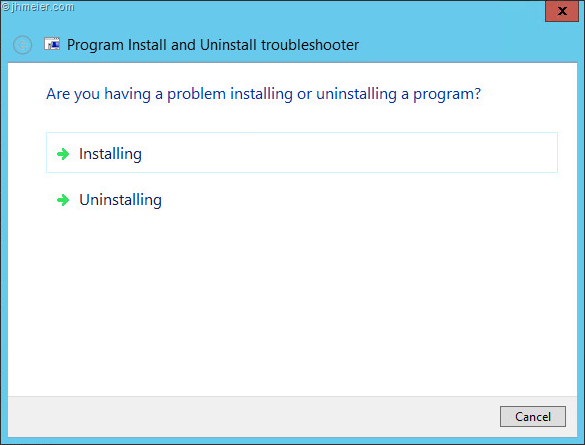
You now get a much bigger list (compared to the one under Programs) – here you can see all Programs and their “Sub-Programs”. Now select your faulting part of the VDA – e.g. Citrix Profile Management. 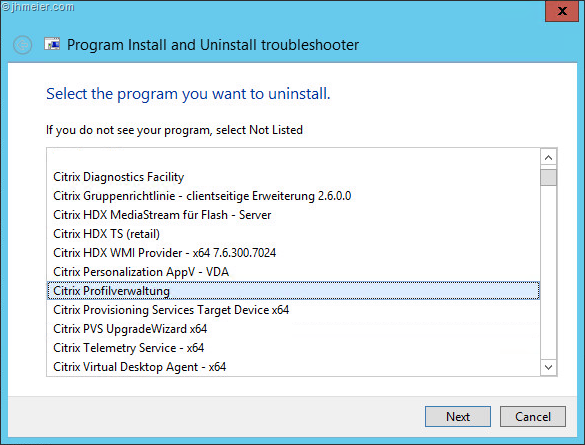
Select Yes, try uninstall to start the removal. 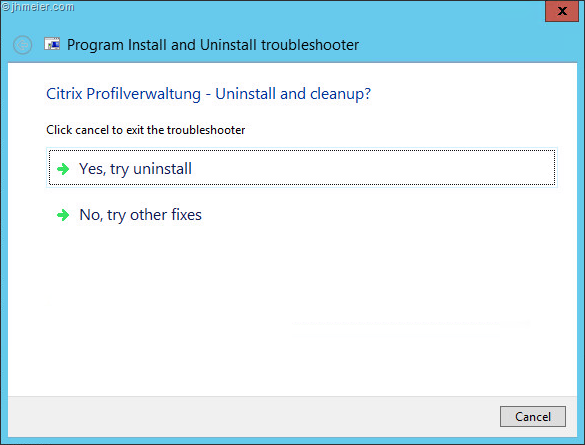
The Tool now tries to remove the selected package…. 
… and resolves problems found during the removal. 
After some time you should see the following dialog: 
The problematic VDA-Component is now removed.
You can now restart the VDA removal like before – if another failing component is shown – just repeat the steps above.


 Jan Hendriks Blog
Thanks Jan to share this solution. I already ran twice in this issue.
You’re welcome
THX
Exactly what I needed – thanks for posting this
Thanks, your post saved my day (struggling with pvd uninstall not working)
Thanks for your post .. saved me a lot of time and effort !! Keep up the good work.
Thanks, did work.
this saved my bacon!! worked perfectly. I was on the verge of having to rebuild about 8 citrix servers.
thank you!!
This was great! i just matched the {ID in question} and you can hover over in the installer\uninstall and find the problematic service
Thank you so much. This saved my rear today.