(Initial) StoreFront Configuration Replication Fails with error 31
In one of my last projects I had an interesting problem with Storefront. Neither the initial configuration replication nor following ones worked. 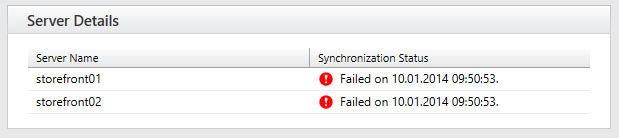
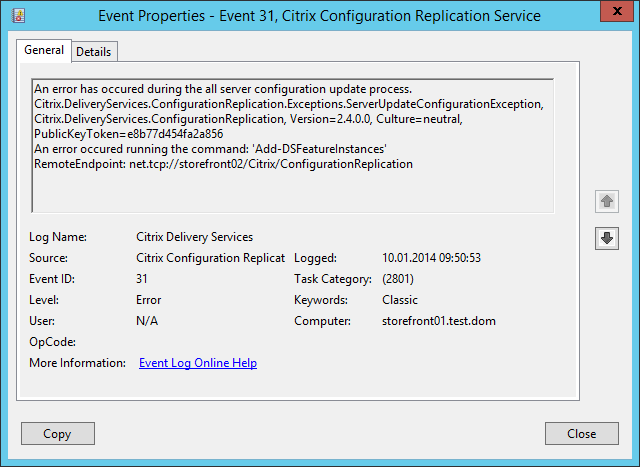
On the first StoreFront Server the following error was logged:
Log Name: Citrix Delivery Services
Source: Citrix Configuration Replication Service
Event ID: 31An error has occured during the all server configuration update process.
Citrix.DeliveryServices.ConfigurationReplication.Exceptions.ServerUpdateConfigurationException, Citrix.DeliveryServices.ConfigurationReplication, Version=2.4.0.0, Culture=neutral, PublicKeyToken=e8b77d454fa2a856
An error occured running the command: ‘Add-DSFeatureInstances’
RemoteEndpoint: net.tcp://storefront02/Citrix/ConfigurationReplication
On the second Server I found the following three errors:
Log Name: Citrix Delivery Services
Source: Citrix Configuration Replication Service
Event ID: 1An error occured running the command: ‘Add-DSFeatureInstances’
Exception of type ‘Citrix.DeliveryServices.Framework.Web.Deployment.Exceptions.WebApplicationAlreadyExists’ was thrown.
Citrix.DeliveryServices.PowerShell.Command.Runner.Exceptions.PowerShellExecutionException, Citrix.DeliveryServices.PowerShell.Command.Runner, Version=2.4.0.0, Culture=neutral, PublicKeyToken=e8b77d454fa2a856
An error occured running the command: ‘Add-DSFeatureInstances’
Log Name: Citrix Delivery Services
Source: Citrix Configuration Replication Service
Event ID: 12Failure to notify of configuration update.
Citrix.DeliveryServices.PowerShell.Command.Runner.Exceptions.PowerShellExecutionException, Citrix.DeliveryServices.PowerShell.Command.Runner, Version=2.4.0.0, Culture=neutral, PublicKeyToken=e8b77d454fa2a856
An error occured running the command: ‘Add-DSFeatureInstances’
at Citrix.DeliveryServices.PowerShell.Command.Runner.PowerShellCommandRunner.RunCommand(IPowerShellCommand command)
at Citrix.DeliveryServices.ConfigurationReplication.PowerShell.ConfigurationWriterBL.AddFeatureInstances(List`1 instancesToCreate, List`1 featureClasses)
at Citrix.DeliveryServices.ConfigurationReplication.BL.Synchronisation.ConfigurationSync.SynchroniseInstances(FeatureInstancesInfo instances)
at Citrix.DeliveryServices.ConfigurationReplication.BL.Synchronisation.ConfigurationSyncController.Update(Guid primarySynchronisationLevel)
at Citrix.DeliveryServices.ConfigurationReplication.BL.Synchronisation.ConfigurationSyncController.UpdateHostConfiguration(Guid synchronisationLevel, IConfigurationSync sync, IConfigurationReplication proxy, IPersistServiceState store)
at Citrix.DeliveryServices.ConfigurationReplication.BL.Synchronisation.ConfigurationSyncController.UpdateHostConfiguration(Guid synchronisationLevel, String proxyEndpoint)
at Citrix.DeliveryServices.ConfigurationReplication.WCF.ConfigurationReplication.<>c__DisplayClass3.<BeginUpdateConfiguration>b__1(Object asr)
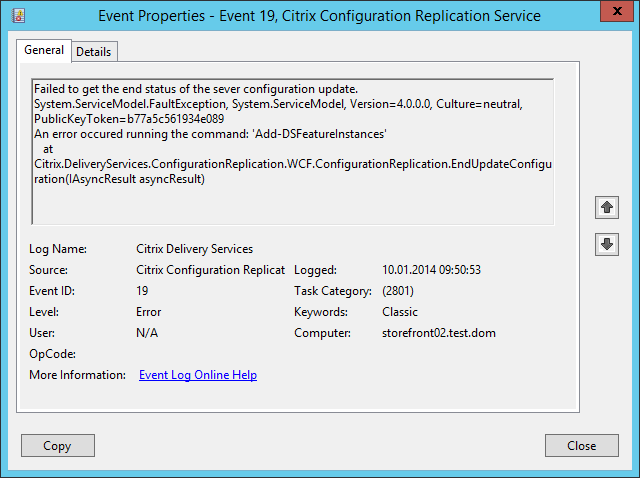
Log Name: Citrix Delivery Services
Source: Citrix Configuration Replication Service
Date: 10.01.2014 09:50:53
Event ID: 19Failed to get the end status of the sever configuration update.
System.ServiceModel.FaultException, System.ServiceModel, Version=4.0.0.0, Culture=neutral, PublicKeyToken=b77a5c561934e089
An error occured running the command: ‘Add-DSFeatureInstances’
at Citrix.DeliveryServices.ConfigurationReplication.WCF.ConfigurationReplication.EndUpdateConfiguration(IAsyncResult asyncResult)


If you google for problems like these you find hints like:
- Delete some specific files on the secondary StoreFront Server and synchronize again
- Remove StoreFront from the secondary StoreFront Server – don’t forget do manually delete C:\inetpub\wwwroot\Citrix and C:\ProgramFiles\Citrix\Receiver StoreFront – Remove second StoreFront Server from StoreFront Group – Reinstall second StoreFront Server and join again
- Uninstall StoreFront on both Servers – remove folders mentioned in two – reinstall StoreFront and create a new StoreFront Group
None of them worked for us – but if you read the first Event on the secondary StoreFront Server carefully you already get a got hint why the replication fails:
‘Citrix.DeliveryServices.Framework.Web.Deployment.Exceptions.WebApplicationAlreadyExists’
Though we also checked the StoreFront Log-Files in C:\ProgramFiles\Citrix\Receiver StoreFront\Admin\logs and then we found an interesting entry in the file Add-DSWebReceiver :
There is already a web app at 1 /Citrix/StoreWeb
WebReceiverInstance:Deploy failed due to exception: Citrix.DeliveryServices.Framework.Web.Deployment.Exceptions.WebApplicationAlreadyExists: Exception of type ‘Citrix.DeliveryServices.Framework.Web.Deployment.Exceptions.WebApplicationAlreadyExists’ was thrown.
Ok – we removed StoreFront (on the second Server) again completely (with all files) and opened the IIS-Management-Console: 
What’s that? StoreFront is removed but there’s still a “StoreWeb” available? After checking the file-system – there was no StoreWeb availble – we removed the folder in the IIS console.
After reinstalling StoreFront and joining to the StoreFront Group the configuration synchronization worked without any problems. 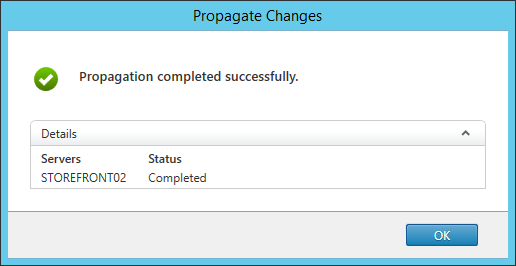
Hope this helps some of you if you have problems with your StoreFront synchronization.
Just one more hint at the end – StoreFront also supports a more intensive verbose logging. The usage is described in CTX139592.


 Jan Hendriks Blog
You Rock. I wasted two hours before finding this post and bam !! worked like a charm. The IIS was still hosting a virtual folder from previous configuration.
Still works on CVAD 2112!! 6 years later, still saving peoples bacon! Thanks.
We have wasted almost 6 hours to investigate the problem until we found this article.
Thank you!!!