Citrix Receiver: The configuration manager cannot be initialized
Today I would like to describe you an interesting problem I had during my last receiver deployments. The start of the installation always failed with the message:
The configuration manager cannot be initialized.

After removing all old Receiver Installations the error still occurred. I cleaned up the registry and file system and removed everything which contained Citrix – but still the same error.
The next step was to use the Citrix Receiver Clean-Up Utility (CTX137494) – normally this tool removes everything related to old Receiver or Online Plugin Versions. But this time this didn’t fix the problem – after using the tool the same error was displayed like before. Time for a more intensive debug and check with procmon which files and registry keys are accessed during the setup start. And there it was – the setup tried to access the following registry key:
HKEY_CLASSES_ROOT\Installer\UpgradeCodes\9B123F490B54521479D0EDD389BCACC1
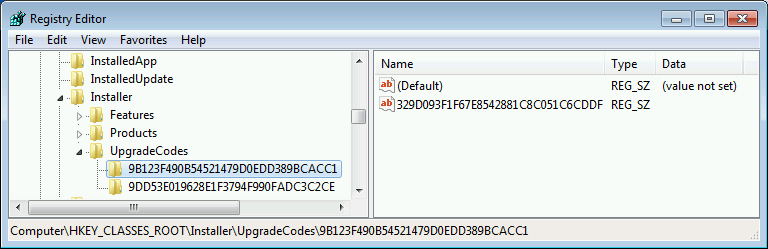
I removed the complete registry key and tried again to install the receiver – this time the setup started without any error messages and I was able to install the receiver.



 Jan Hendriks Blog
thank you!
wow! thanks!!!
I have been searching forever to find a solution!
You have been a LIFE SAVER since even Citrix had not provided a solution.
You’re welcome 🙂
That worked for me. Thanks
Thank you! Confirmed that it`s working! Your are a clever guy.
Thank you!!
me toooo… you are my saviour..I’ve been waiting for this resolution about a year..thanks dude..
Super Tipp, danke!!! Unglaublich, was sich Citrix da leistet…
Thanks man!! It saved my life 🙂
Thank you….ditto on previous comments.
Thank you for this fix, worked perfectly
Amazing, thank you so much!!!!!
It as fix my problem too
I have citrix receiver enterprise 13.4
Thnak You! It worked fine for me.
Thank you so much!
Seven years later, and this fix still works! Thank you!
omg thank you, you also saved my life. Otherwise I would have died too like all the others here, and a funeral these days is really expansive!
This tipp really helped me out. 🙂
We are in February 2022 and still valid for the last version of CitrixWorkspaceApp.exe (22.2.0.4525)! Incredible!
The embedded ReceiverCleanupUtility.exe doesn’t fix the issue…
Thanks. This worked for me when I could not upgrade or uninstall or install any version of the Citrix Workspace app. Citrix support and articles were useless.
Just tried this in 2023 and it still works. Window key + r will open the run dialog window. If you type in regedit and click ok, that will bring up the registry editor window where the upgrade codes are located. The upgrade code I had to delete was in HKEY_CURRENT_USER\SOFTWARE\Microsoft\Installer\UpgradeCodes. After deleting the code I was able to install CitrixWorkspace no problem. Thanks for the help!
Und auch neun Jahre später funktioniert dieser Hinweis. VIELEN Dank dafür, save my a*** 😉